Kubernetes dashboard
How to install and configure the Kubernetes dashboard, including SSH tunneling, token retrieval, and enabling insecure HTTP access.

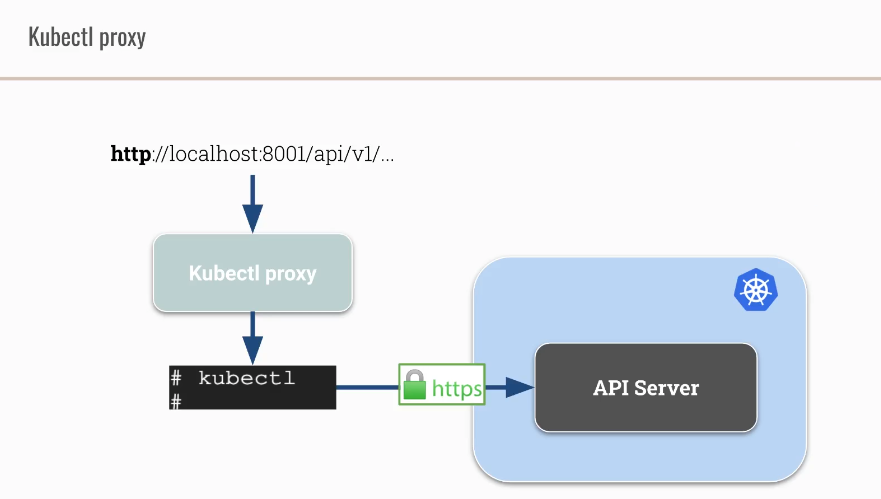
Kubectl proxy
- creates a proxy server between localhost and the Kubernetes API Server
- uses connection as configured in the kubeconfig
- Run
kubectl proxycommand at your master node cks-master
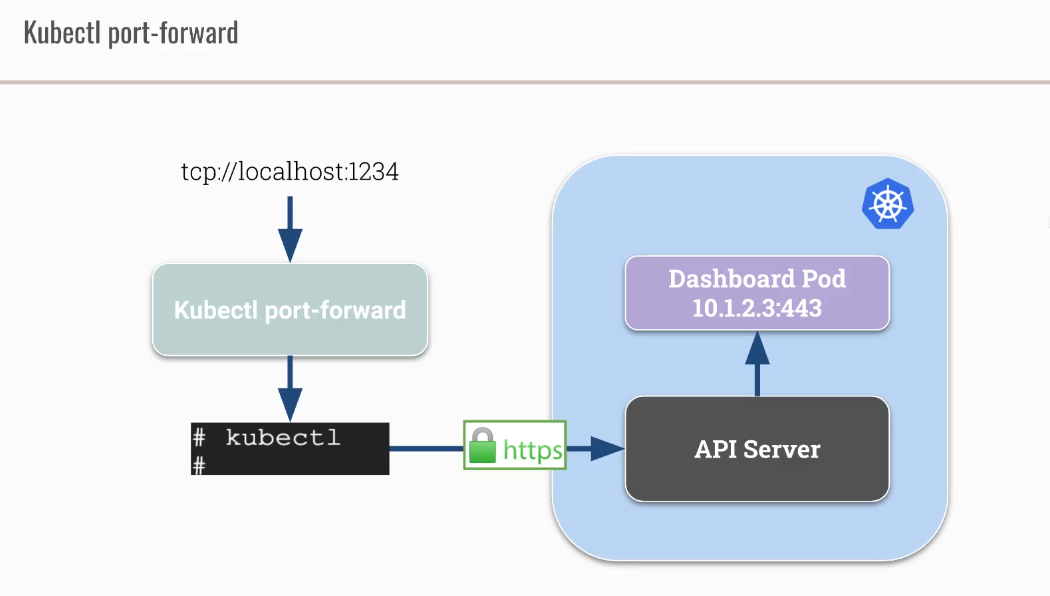
Kubectl port-forward
Install Kubernetes dashboard
Deploy the Kubernetes dashboard using the official recommended manifest. This creates the dashboard Deployment, Service, and required RBAC resources in the kubernetes-dashboard namespace.
1
kubectl apply -f https://raw.githubusercontent.com/kubernetes/dashboard/v2.5.0/aio/deploy/recommended.yaml
Create SSH tunnel to cks-master
1
ssh -i  ~/.ssh/google_compute_engine -L8001:127.0.0.1:8001 jantoth@35.198.101.56
Find a token belonging to kubernetes-dashboard serviceaccount
1
kubectl  get secret kubernetes-dashboard-token-c7j68 -n kubernetes-dashboard  -ojsonpath='{.data.token}' | base64 -d
How to enable insecure HTTP at kubernetes dashboard
To enable insecure HTTP access, edit the dashboard Deployment to disable auto-generated certificates and add the --insecure-port=9090 flag. You also need to update the Service to match the new port.
1
2
3
4
5
6
7
8
9
10
11
12
13
14
15
16
17
18
19
20
21
22
23
24
25
26
27
28
29
30
31
32
33
34
35
36
37
38
39
40
41
42
43
44
45
46
47
48
hugo % k edit deployments.apps -n kubernetes-dashboard kubernetes-dashboard
deployment.apps/kubernetes-dashboard edited

...
    matchLabels:
      k8s-app: kubernetes-dashboard
  strategy:
    rollingUpdate:
      maxSurge: 25%
      maxUnavailable: 25%
    type: RollingUpdate
  template:
    metadata:
      creationTimestamp: null
      labels:
        k8s-app: kubernetes-dashboard
    spec:
      containers:
      - args:
        # - --auto-generate-certificates            < ------- disable this option !!!
        - --namespace=kubernetes-dashboard
        - --insecure-port=9090                      < ------- add this option !!!
        image: kubernetesui/dashboard:v2.5.0
        imagePullPolicy: Always
        livenessProbe:

        ...
        PLUS adjust readiness and livenessProbe ...
        ...


# edit service too
k edit svc -n kubernetes-dashboard kubernetes-dashboard
apiVersion: v1
kind: Service
metadata:
  ...
  ...
  ports:
  - nodePort: 30222
    port: 9090
    protocol: TCP
    targetPort: 9090
  selector:
    k8s-app: kubernetes-dashboard
  sessionAffinity: None
  type: NodePort
This post is licensed under CC BY 4.0 by the author.